

ESI JDE ODBC Driver
Universal ODBC access to JD Edwards® EnterpriseOne® — a modern alternative to legacy JDE ODA connectivity
ESI JDE ODBC Driver provides a practical, familiar, easy-to-use way to access JD Edwards data from reporting tools, spreadsheets, integration utilities, desktop applications and custom software. Instead of forcing every tool to understand JDE internals, it exposes JDE data through the most universal data access interface there is: ODBC.
All the smart, JDE-aware features people wanted from the old JDE ODA driver — modernized, easier to deploy and with multiple back-end options. The driver uses JDE credentials, observes JDE Table Security automatically and can operate through three separate back-ends: FAT, XML and AIS. JDE-aware conveniences include UDC expansion, automatic decimals and currency handling, automatic Julian-date conversion and support for either Long or Short column names.
- Product Brief
- For Reporting & Analytics
- For Developers & Integrators
- For Security & CNC
- System Requirements
- Licensing
ODBC is still the common language of business data access. It is supported by a huge range of tools — reporting products, BI platforms, ETL tools, Microsoft Excel, Microsoft Access, scripting environments and custom applications. ESI JDE ODBC Driver brings that universal access model to JD Edwards data while preserving the JDE security model: users connect with their JDE credentials, and access is automatically constrained by JDE Table Security.
The result is simple. Users and tools get familiar ODBC access; administrators retain JDE-controlled authentication and table-level protection.
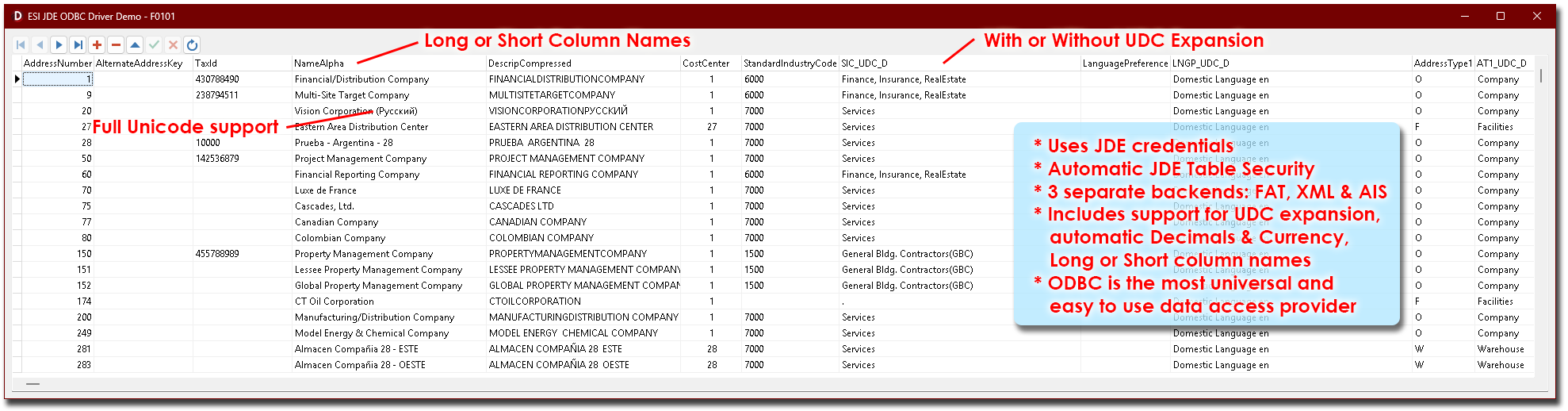
The capability set, at a glance:
- Uses JDE credentials — not separate DB credentials.
- Automatic JDE Table Security — access is constrained the same way the JDE Fat Client constrains it.
- Three separate back-ends — FAT, XML and AIS — pick the one that fits your landscape.
- UDC expansion — the human-readable description, not just the code.
- Automatic decimals, dates and currency handling — correct values out of the box, no extra per-field arithmetic in the reporting tool.
- Long or Short column names — technical or business audience, your pick.
- Universal ODBC interface — the same data source works for everything that speaks ODBC.
For Reporting & Analytics
The point of an ODBC driver for JDE is to stop forcing every report writer, every dashboard and every spreadsheet to re-implement JDE internals. With this driver, the data arrives the way it should — numbers as numbers, dates as dates, currencies in the right scale, and codes paired with their descriptions.
- Numbers behave like numbers. JDE stores monetary values as integers with an implicit decimal position. Most third-party drivers expose them that way too, leaving the reporting tool to divide by 100, 1000 or whatever the data dictionary says — per field, per query. This driver applies the correct decimal automatically.
- Dates behave like dates. JDE Julian dates (CYYDDD) are converted to real dates — ready for any reporting tool’s built-in date functions, filters and grouping.
- Currencies behave like currencies. Automatic currency-aware handling means the amounts you see match the amounts the JDE application screens show.
- UDCs come with their descriptions. Instead of joining to F0005 in every report, ask for the value — the description is there.
- Column names you can live with. Long names (e.g. Address Number) for the business audience; Short names (e.g. AN8) for the technical one.
- Works with anything that speaks ODBC — Excel, Power BI, Tableau, Qlik, Crystal Reports, SSRS, Looker Studio (via ODBC bridge), Access, KNIME, plain Python or any scripting environment with an ODBC client.
For Developers & Integrators
The three-backend design exists so the driver can fit different JDE landscapes — not just the one Oracle assumed when ODA was designed. Pick the back-end that matches your deployment topology and your integration constraints.
- FAT back-end — uses JDE Fat Client API calls. Maximum compatibility with classic JDE deployments, fully JDE-aware, ideal for desktop tools and developer workstations that already have a JDE Fat Client installation.
- XML back-end — routes through the JDE XML kernel. Light footprint, no Fat Client required on the calling machine, good for server-side integrations.
- AIS back-end — routes through the AIS server. Useful where AIS is already standardized as the integration boundary.
Universal ODBC means universal client support. Every common programming language has an ODBC client — pyodbc in Python, System.Data.Odbc in .NET, JDBC-ODBC bridges in Java, native ODBC in C and C++. If the language can talk to a database, it can talk to JDE through this driver.
JDE-aware field handling means common reporting and integration problems are reduced before the data reaches the target tool. Numeric values come through with the correct decimal interpretation; currency fields are handled automatically; dates arrive in the regular format; UDC values can be expanded into more meaningful data; and column naming can be adjusted to suit either technical or business users.
For Security & CNC
Granting external tools direct access to the JDE database has always been the security team’s least favourite conversation. This driver removes the conversation: it does not hand out database credentials and it does not bypass JDE security.
- Users connect with JDE credentials — the same JDE user, the same password, the same lifecycle as their Fat Client login.
- JDE Table Security applies automatically. If a user cannot see F4111 in the Fat Client, they cannot see F4111 through the driver. The security model you already maintain in JDE is the security model that applies to ODBC access.
- No back-door DB users. There is no shared SQL Server / Oracle login that the driver uses behind the scenes — nothing for a leaver, an auditor or an attacker to inherit.
- Choice of back-end fits your network policy. If outbound DB connections from user desktops are forbidden, route through XML or AIS; if AIS is already the sanctioned integration channel, use it; if the Fat Client is already deployed and trusted, use FAT.
- Standard ODBC means standard tooling. No bespoke connector to assess, no opaque binary protocol to allow through a firewall.
OS: MS Windows (x32 or x64)
CPU: Intel / AMD (x32 or x64)
System Type: Physical or Virtual
JDE Releases: JD Edwards EnterpriseOne
JDE Backend Database Platforms: DB-independent — all platforms supported by JDE can be accessed through the relevant JDE back-end
Client Software: Any ODBC-capable application or development environment
For JDE integration:
Expose JDE business functions (BSFNs) as REST endpoints - EveREST2JDE
Native JDE BSFNs for SFTP transfers - Easy JDE SFTP
Develop and test XML against JDE - ESI JDE XML Playground
For JDE Identity & SSO:
Standards-based SSO for JDE - XpreSSO
All Integration & Data tools:

