

JDE Orchestration Workbench
Bulk-execute JD Edwards orchestrations from a familiar spreadsheet-style grid — the mass-update tool for the modern orchestration era
JD Edwards orchestrations are a powerful way to invoke EnterpriseOne business logic from any client — but running them one at a time through Orchestrator Studio or a tool like Postman is slow, technical, and impossible to hand off to a non-technical user. When you need to mass-update a thousand customer addresses, kick off a hundred batch jobs in sequence, or pull data for a thousand items, you end up writing custom client code or falling back on direct table manipulation.
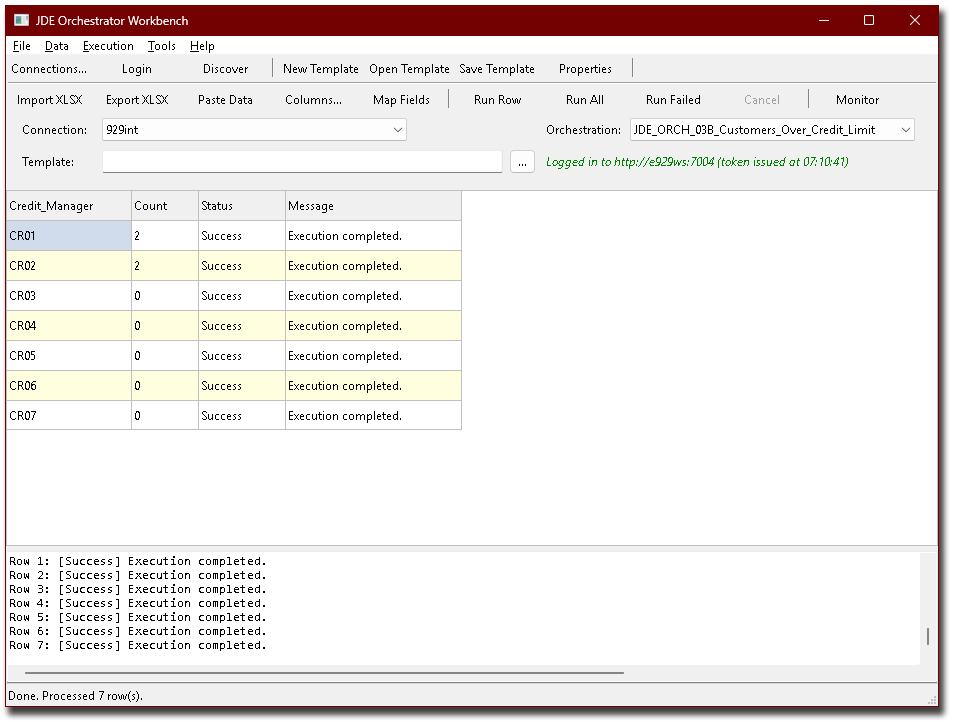
JDE Orchestration Workbench fixes that. It looks and works like a spreadsheet: each row is one orchestration call, each column is one input. Click Run All and watch progress live. Status and returned data land in adjacent columns. Re-run only the failed rows. Save the configuration as a template and hand it to your operations team for future runs.
It runs on any Windows PC, talks to any modern AIS server, and makes zero changes to your JDE environment.
Current version: 1.0
- Product Brief
- For Functional Users
- For Power Users & Designers
- For Business Owners
- For IT & CNC
- System Requirements
- Licensing
The problem. JD Edwards orchestrations are a great way to expose EnterpriseOne business logic for consumption by any client — but Oracle’s own tooling for actually running them (Orchestrator Studio, Postman, custom Java/Python clients) is fundamentally one-call-at-a-time, technical, and not something you can hand to a functional user with a list of 500 records to update.
The solution. JDE Orchestration Workbench treats orchestrations the way ADEX treated business functions — as something you mass-execute from a tabular UI. Build (or paste in from Excel) a grid where each row is an orchestration call. Each column maps to an input. Click Run. Per-row status and any returned data come back in the grid alongside your inputs.
The experience. Open the workbench, pick your connection profile, pick the orchestration from a dropdown, pre-fill the grid with one click, paste in your data, click Run All. Watch as each row turns green (success), yellow (warning), or red (error). For failed rows, the exact error appears in the Message column. Fix what you need to fix, click Run Failed, watch only those rows re-execute.
Why it matters. The Workbench delivers four concrete wins:
- Eliminates a class of IT escalations: functional users run their own bulk updates instead of filing tickets.
- Scales without scaling headcount: once a template exists, anyone on the team can run it.
- De-risks mass updates: per-row execution, per-row status, full audit trail, easy retry. Compare to “run a SQL UPDATE in production and hope.”
- Pays for itself in weeks: a single mass-update job saved from custom-coding typically exceeds the licence cost.
For Functional Users
You have a list of records that need updating. You know the orchestration that does the update. You don’t want to file a ticket and wait two weeks for IT to write a script.
The Workbench is built for you:
- It looks like Excel. If you can use Excel, you can use this. Columns are input fields. Rows are records to act on. Cell-by-cell editing. Standard keyboard navigation.
- Paste from Excel. Copy a range from your existing spreadsheet, paste it in, run it. The Workbench tolerates extra columns, blank rows, mixed encodings and unusual whitespace.
- Live progress. Watch each row turn green / yellow / red as it finishes. The status bar shows “Running row 47 of 312”.
- Easy retry. Something fails halfway through? Click Run Failed. Only the bad rows re-execute. Successful rows stay where they are.
- No surprises. What you see is what gets sent. The orchestration payload is built from the visible cells, with nothing hidden.
- Audit trail. Every run is logged with date, user, orchestration name, and per-row outcome — to a rotating local file you (or IT) can keep for compliance.
- Cancel anytime. A long Run All can be stopped at the next row boundary. The grid keeps everything that finished before the cancel.
The net effect: a task that used to be a two-week IT escalation becomes a fifteen-minute exercise — one a non-technical user can drive end-to-end.
For Power Users & Orchestration Designers
If you build orchestrations, you spend a lot of time testing them — and most of that time is on the plumbing (building test requests, parsing test responses, scripting iteration) rather than on the orchestration logic itself.
The Workbench eliminates the plumbing:
- Live discovery. Point at an AIS server, get a dropdown of every orchestration on it. Pick one, see its declared inputs and outputs. No Swagger hunting, no Studio sessions.
- One-click grid pre-fill. “Add columns for this orchestration’s inputs and outputs” is one click. Drop in test data, click Run.
- Iterate fast. Tweak the orchestration on the server, click Run again. Side-by-side: your test inputs unchanged, the latest response in the output columns next to each row.
- Templates as files. When the test grid becomes the production runbook, save it as a template. Templates bundle the orchestration name, column layout, field mappings, default values and optional assertions into a single JSON file. Source-controllable. Diff-able. Shareable across the team.
- Multiple environments. Named connection profiles for DV, PY and PD. Switch the active profile, the same template runs against a different environment. No edits.
- Talks to any modern AIS. Supports both the proprietary
/jderest/discoverendpoint (older Tools Releases) and the OpenAPI catalog (/jderest/v3/open-api-catalog) used in newer releases — the workbench detects which is available and adapts. - Custom output mapping. Direct any orchestration output into the column of your choice; default values for cells the user left blank; mark inputs as required even if the orchestration didn’t declare them so.
The Workbench owns the “run this orchestration five hundred times against this list” loop. Postman, curl and your custom Python scripts can stick to what they’re good at — one-off probes and CI integration.
For Business & Operations Owners
The case for JDE Orchestration Workbench is direct:
- It eliminates a class of escalations. “Can IT write us a script to update 300 records?” — gone. The functional user runs the right template themselves.
- It scales without scaling headcount. Build the template once. Anyone on the team can then run it. Training is measured in minutes, not days.
- It de-risks mass updates. Per-row execution, per-row outcome, easy retry of failed rows, complete log. Compare to the alternatives — direct SQL on production, hand-written client scripts, or a long IT engagement — and the risk picture is much better.
- It works with what you have. Any modern AIS server, any JDE release that supports orchestrations. Nothing to install on the JDE side. No new servers to provision.
- It complements rather than replaces existing tools. Pairs naturally with our other JDE integration products for a complete read & write toolset.
For most customers, the licence pays for itself the first time a mass-update task is run on the Workbench rather than being custom-coded or outsourced.
For IT & CNC
JDE Orchestration Workbench is engineered to drop into a real JDE environment without ceremony.
Architecture:
- Desktop Windows application (Delphi 12 VCL). Single executable. No installer required for evaluation.
- Talks to JDE AIS via the standard
/jderest/*REST endpoints. No JDE-side install, no AIS code changes, no AIS configuration changes. - Read & write capable, but every change goes through your declared orchestrations — meaning your existing JDE row, column, application and orchestration security is always applied.
Compatibility:
- Any AIS server from Tools Release 9.2.3.x onwards. Tested against TR 9.2.6 through 9.2.8.
- Supports both the proprietary
/jderest/discoverendpoint (older TRs) and the OpenAPI catalog (/jderest/v3/open-api-catalog) — the workbench detects which is available and adapts on the fly. - Orchestration versions v1, v2 and v3 all supported via correct AIS URL routing.
Security:
- Standard AIS authentication via username & password, or single sign-on via our XpreSSO® service (SAML2 / OIDC; works with Entra, Okta, Google, AWS, Auth0, OCI IDCS, ADFS). When XpreSSO is enabled, no JDE credentials are stored on the workbench machine — the workbench obtains a session token via a browser-redirect flow.
- Every call goes through standard AIS authentication. Whatever orchestrations a user has rights to execute in AIS, they can execute here. Whatever they don’t, they can’t.
- Automatic re-authentication on session expiry mid-run. No failed batches due to AIS inactivity timeout.
- Per-process unique device names so concurrent users don’t collide on AIS-side session tracking.
- All data stays on your infrastructure — no cloud, no telemetry, no data leaving the building.
Operations:
- Persistent rotating log (10 MB × 10 files = 100 MB of rolling history per user) under the user’s Documents folder. Captures every login, orchestration call, response, retry, and error.
- Templates are plain JSON — versionable, source-controllable, diffable, shareable.
- Connection profiles stored locally per user; passwords held only when XpreSSO is not in use.
- Idempotent retry-friendly architecture: re-running a Run Failed sweep is always safe.
Roadmap (Phase 2):
- Direct Excel round-trip for ADEX-style migration scenarios.
- Scheduled / unattended execution — run a saved template at 2 AM.
- Optional REST endpoint for triggering a saved template programmatically from other systems.
The Workbench pairs naturally with our ESI JDE ODBC Driver for read-side analytics, our EveREST2JDE service for write-side automation, and our MRO Storeroom & Search for inventory-side discovery.
OS: Microsoft Windows 10 / 11, or Windows Server 2016 or later
CPU: any x64 (workload is network-bound, not CPU-bound)
RAM: 1 GB available to the workbench is ample (the application itself is small; plus whatever Excel and other tools you have open alongside)
Disk: 50 MB for the application, plus up to 100 MB of rolling log space per user
System Type: Physical or Virtual; standard user account is sufficient (no Administrator rights required to run)
JDE Releases: E910, E920 (x32 or x64), or any release with an AIS server on Tools Release 9.2.3.x or later
JDE Tools Releases: 9.2.3.x or later (9.2.6+ recommended)
JDE Backend Database Platforms: DB-independent — the workbench talks to AIS, AIS handles the database. All JDE-supported platforms apply.
AIS Server: Reachable on HTTP or HTTPS from the workbench client machine
Browser Any modern browser (Chrome, Edge, Firefox, Safari) — used to complete the SSO sign-in dialog
Network: Standard HTTP/HTTPS access to your AIS server (and to the XpreSSO server, if SSO is enabled)
For data access & integration:
A proper ODBC driver for JDE - ESI JDE ODBC Driver
Expose JDE business logic as a programmable REST service - EveREST2JDE
For inventory & MRO search:
Cross-table full-text search across JDE Item Master, Item Branch and Item Location - MRO Storeroom & Search
For identity & SSO:
Optional sign-on for the Workbench - XpreSSO
For AI agents:
Call the same orchestrations from MCP-enabled AI clients (discovery, introspection, execution, with login support) - AI MCP Servers
All JDE integration & automation tools:

